

If you have ever needed data from a large number of web pages, you probably reached a simple conclusion very quickly: "Let's just write a scraper."
In a way, that's right. With Python and a few good tools, you can collect in minutes what would take hours or even days by hand.
But there is a more important question: should you build a scraper for this at all?
Web scraping is not just a few lines of code that grab a product's title and price. Once a project gets serious, you run into changing site structures, high request volumes, JavaScript-rendered pages, network errors, access restrictions, incomplete data and ongoing maintenance.
This article looks at scraping from that angle: what web scraping is, when it is actually worth it, and what to think about before you start.
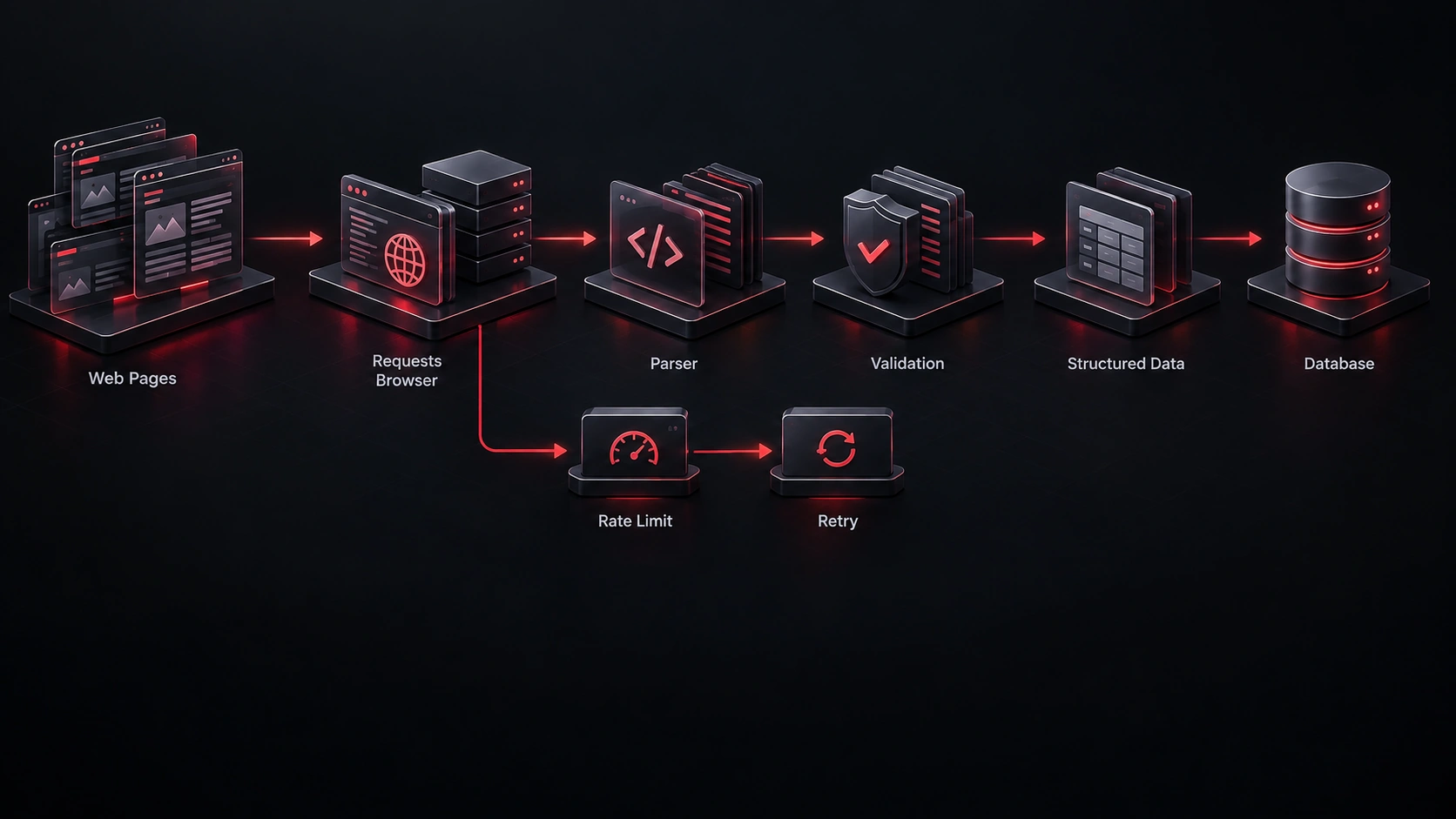
What is web scraping?
Put simply, web scraping is the automated extraction of information from web pages.
Imagine you need prices for 10,000 products spread across hundreds of pages. Doing it by hand would take forever. A program, on the other hand, can fetch the pages, find the data in the HTML and save it to a file, a database or another system.
A simple flow looks like this:
Website
   ↓
Request
   ↓
HTML / Response
   ↓
Parser
   ↓
Extracted Data
   ↓
Database / CSV / API
For simple pages, requests and BeautifulSoup are usually a good starting point:
import requests
from bs4 import BeautifulSoup

url = "https://example.com/products"

response = requests.get(
    url,
    timeout=10,
    headers={
        "User-Agent": "my-scraper/1.0 (+mailto:you@example.com)"
    },
)

response.raise_for_status()

soup = BeautifulSoup(response.text, "html.parser")

for product in soup.select(".product"):
    title = product.select_one(".title")

    if title:
        print(title.get_text(strip=True))
A note on the User-Agent: we are deliberately not pretending to be a browser here. A clear name and a contact address tell the site owner where the requests come from, so if something goes wrong they can reach you instead of simply blocking you.
But this is only the easy part. A real scraper also has to handle errors, structure changes, pagination, retries, timeouts, storage, logging and large request volumes.
Ask a more important question first
A common mistake is jumping straight to choosing a library:
Should I use BeautifulSoup or Scrapy?
before knowing whether scraping is even the right solution.
Before picking a tool, answer these questions:
- What data exactly do you need?
- How often does it change?
- How many pages and how many sites are involved?
- Is the data available through an API?
- Is the page rendered with JavaScript?
- Where will the output be used?
- If the site's structure changes tomorrow, who maintains the system?
These answers shape the project's architecture far more than the choice between two libraries.
When is web scraping actually worth it?
There are a few scenarios where scraping makes complete sense.
Data without a suitable API
The information you need is publicly displayed on a site, but there is no usable API to get it in a structured form. Scraping is a practical option here, after you have checked the site's terms of use and the rules that apply to that data.
Monitoring changes
Scraping is not only about collecting data; you can also watch a site for changes:
Product Page
     ↓
Extract Price
     ↓
Compare With Previous Value
     ↓
Changed?
   ↙     ↘
 Yes      No
  ↓        ↓
Notify    Ignore
A product's price, stock status, a page update or a newly added item. Here the real value doesn't come from scraping itself; it comes from what you do with the data after extracting it.
Collecting data for analysis
Sometimes the data doesn't need to be real-time. You may want to collect a few thousand pages every day and analyze them later. In that case, scraping becomes the first stage of a data pipeline:
Web
 ↓
Crawler
 ↓
Raw Data
 ↓
Cleaning
 ↓
Database
 ↓
Analysis
 ↓
Dashboard / Report
Automating a repetitive process
Sometimes what we call scraping is really scraping plus automation: log into a site, search for a term, open the results, extract the data, save it and perform a specific action. In projects like this, plain HTML may not be enough and you may need browser automation.
When is an API the better choice?
If there is an official, suitable API for the data you need, it is usually the first option to evaluate, because APIs are designed for machine access.
Instead of fetching HTML and digging the price out of it, an endpoint returns something like this directly:
{
    "id": 123,
    "name": "Product A",
    "price": 1250000,
    "available": true
}
You are no longer tied to the HTML structure. That usually means:
- less parsing
- less dependence on how the page looks
- fewer errors
- easier maintenance
- more structured data
That said, an API is not always the best choice: it may have rate limits, costs, authentication or data restrictions. Compare the real costs and limits of both approaches.
Check the Network tab before anything else
One trick that pays off again and again in real projects: many JavaScript-heavy sites load their data from an internal JSON endpoint. Open your browser's developer tools (F12), go to the Network tab, filter by Fetch/XHR and reload the page.
If you find a response that returns clean, structured data, you can often fetch it directly with requests, with no HTML parsing and no browser at all. Just remember that these endpoints are not official or documented and can change without notice, and the site's terms of use still apply.
BeautifulSoup, Scrapy or Playwright?
These three are often mentioned together, but they are not really substitutes for one another.
BeautifulSoup
Great for parsing HTML and pulling information out of it, especially when you already have the HTML and only need a few specific parts:
from bs4 import BeautifulSoup

html = """
<div class="product">
    <h2>Keyboard</h2>
    <span class="price">120</span>
</div>
"""

soup = BeautifulSoup(html, "html.parser")

title = soup.select_one(".product h2")
price = soup.select_one(".product .price")

print(title.get_text(strip=True))
print(price.get_text(strip=True))
For simple projects, this is all you need.
Scrapy
Once a project grows beyond a handful of pages and requests, Scrapy becomes the more serious option. It is built for crawling and comes with a request scheduler, concurrency, middleware, pipelines and the ability to pause and resume jobs.
When you need to process thousands or millions of URLs in a structured way, a dedicated framework usually makes more sense than writing all of those pieces from scratch.
Playwright
Now imagine a page whose main content is built after JavaScript runs. The initial HTML that requests fetches may not contain that data at all.
This is where browser automation tools like Playwright come in. Playwright actually runs and controls a browser, so you can wait for the data to load and then extract it:
import asyncio

from playwright.async_api import async_playwright


async def main():
    async with async_playwright() as p:
        browser = await p.chromium.launch()
        page = await browser.new_page()

        await page.goto("https://example.com/products")

        # Wait until JavaScript has rendered the product list.
        await page.wait_for_selector(".product")

        titles = await page.locator(".product .title").all_inner_texts()
        print(titles)

        await browser.close()


asyncio.run(main())
That power has a cost, though: running a browser uses far more CPU and memory than a plain HTTP request, and it is slower. So don't reach for Playwright by default.
A simple rule for choosing a tool
You can start from here:
Is there an official, suitable API?
  ├── Yes → evaluate the API first
  └── No
       ↓
Is the data in the initial HTML?
  ├── No → Internal JSON in the Network tab?
  │          ├── Yes → fetch it with requests
  │          └── No  → Playwright (browser automation)
  └── Yes
       ↓
How big is the project?
  ├── Small → requests + BeautifulSoup
  └── Large → Scrapy
This rule isn't absolute, but it prevents a common mistake: starting with the most powerful tool just because you can.
The real cost of scraping isn't writing the code
Say you built a scraper in a day. Is the project done? Probably not.
Tomorrow, the target site might:
- change its HTML classes
- change its URLs
- change its pagination
- start loading data with JavaScript
- return a different response
- add rate limits
- restrict automated access
In other words, scraping has an important cost that is usually invisible at the start: maintenance.
If the scraper is for a one-off job, that cost may be acceptable. But if it will run every day for months, take monitoring and error handling seriously from day one.
A good scraper copes with errors
A naive scraper might look like this:
response = requests.get(url)

data = parse(response.text)

save(data)
In a real project, you should at least think about this:
Request
  ↓
Timeout?
  ├── Yes → Retry / Log
  └── No
       ↓
Valid Response?
  ├── No → Log / Skip
  └── Yes
       ↓
Expected Structure?
  ├── No → Alert
  └── Yes
       ↓
Extract
       ↓
Validate
       ↓
Save
Because the worst case isn't always a crash. Sometimes the worst case is a program that runs without a single error but saves the wrong data.
For example, a selector changes and the program picks up some other value instead of the real price. The system can keep producing bad data for hours or days without you noticing. That is why the Validate step matters: a negative or empty price, an absurd number or a required field that is missing should raise an alert immediately.
What happened with my own scraper
A few years ago I wrote a scraper to collect product data from Digikala, Iran's largest online store. I don't remember many of the details, but two things stuck with me.
The first was bad data. Sometimes the scraper ran without any errors, yet what it collected was wrong or jumbled, and I had to spend hours cleaning it up. The time automation was supposed to save went into manual cleanup instead.
The second was changing paths. Whenever the page URLs or their structure changed, the scraper broke and I had to fix it again.
I didn't have a name for it back then, but this was exactly the maintenance cost described above. If I built that scraper again today, the first things I would add are a data validation step and an alert that fires the moment the page structure changes, not after a pile of broken data has already been collected.
Faster is not always better
When there are many pages, it's tempting to send as many concurrent requests as possible. But scraping is not a speed contest.
If you hit a site with very high concurrency, you may:
- use more of your own resources
- get more failed requests
- put the target server under pressure
- trigger rate limits or get blocked
- end up with lower-quality data
For serious crawlers, controlling concurrency and request rate matters a lot. Scrapy even has a feature called AutoThrottle that adjusts the crawl speed automatically based on the server's response times.
The goal isn't to "hit the site as fast as possible"; it's to collect the data you need at a steady, reasonable pace.
Don't ignore robots.txt and the law
robots.txt is a well-known standard (RFC 9309) for telling crawlers which parts of a site they may access. But there's an important catch: robots.txt is not an authentication or access-control system.
If a path is disallowed in robots.txt, it isn't technically impossible to reach; the site owner has simply said they don't want crawlers there, and a responsible scraper should respect that.
On the other hand, the fact that robots.txt doesn't forbid something doesn't mean any use of the data is allowed. The site's terms of use and the laws where you operate matter too, especially if you're collecting personal information such as names, phone numbers or emails, which many countries regulate strictly.
When not to build a scraper at all
I think this is the most important section of the article. Sometimes the best decision is not to build a scraper, for example when:
- an official, suitable API exists
- the amount of data is small enough to collect by hand
- the site keeps changing its structure
- maintenance would cost more than the data is worth
- the data has little business value
- a simpler alternative data source exists
In those situations, a scraper just adds complexity.
On the other hand, if scraping saves a lot of time, collects data that has no good alternative, or creates a stable automated process, it is well worth it.
Answer these 7 questions before you start
If I were evaluating a scraping project before writing a single line of code, I'd ask:
- What data exactly do we need?
- What is the source, and how many pages are involved?
- Is there a usable API or feed?
- How often does the data change?
- Do we need JavaScript rendering or browser automation?
- Will this run once, or for months and years?
- If the site changes, what will maintenance cost?
If the answers aren't clear, it's probably too early to start coding.
Conclusion
Web scraping isn't just "getting data from a website." Once a project becomes real, you have to think about architecture, request volume, data quality, errors, site changes, maintenance and infrastructure cost.
For a single simple page, a few lines of Python may be all you need. For thousands of pages and a permanent system, you'll probably need a crawler, a queue, a database, monitoring and error handling. And sometimes the best decision is not to scrape at all, and to use an API or a better data source instead.
This is how I usually look at it:
Tools matter, but understanding the problem matters more than choosing the tool.
If your goal is more than extracting data, and you want to turn it into an automated, maintainable system, explore my web scraping and automation services.
FAQ
What is web scraping?
Web scraping is the automated extraction of information from web pages and turning it into data that can be used in a file, a database or another system.
Is Python the best language for web scraping?
Python is an excellent choice thanks to its strong ecosystem for scraping, data processing and automation. But the right language also depends on the project and the existing infrastructure; the language alone isn't the deciding factor.
Should I use BeautifulSoup or Playwright for scraping?
Neither is always better. If the data is in the initial HTML, BeautifulSoup is enough. If the page needs JavaScript or browser interaction to show the data, Playwright is the better fit. For large-scale crawling, Scrapy offers a better architecture.