

A Telegram bot can feel perfectly fast during development and early testing. A few users send messages, buttons respond immediately, and database queries seem harmless.
Then the number of users grows.
Suddenly, callbacks take longer to respond, some messages are delayed, and a simple action can sometimes make the entire bot feel slow.
The first reaction is usually to blame the server and upgrade its CPU or RAM. In many real projects, however, the server is not the main problem.
The bottleneck is often inside the application: blocking code, inefficient database queries, slow external APIs, too many concurrent tasks, or long-running work being executed directly inside a handler.
This article looks at the practical reasons Telegram bots become slow as they grow and how to find the actual bottleneck before changing the infrastructure.
What does a slow Telegram bot actually mean?
Before optimizing anything, we need to define what "slow" means.
Imagine a user presses a button and the bot needs to read some data from the database, call an external API, and finally send a response.
If the whole operation takes 200 milliseconds, there may be no obvious problem.
But when hundreds of users trigger similar operations at nearly the same time, shared resources can become the bottleneck.
The database may run out of available connections. An external API may become slow. The event loop may be blocked by synchronous code. CPU usage may increase.
So performance is not only about how long one handler takes.
A better way to look at it is to measure:
- update handling time
- handler execution time
- database time
- external API time
- Telegram API time
- number of concurrent operations
Once these numbers are separated, performance problems become much easier to investigate.
Blocking code is one of the biggest problems
If you are using aiogram or another asynchronous framework, one of the most important rules is simple:
Do not block the event loop.
For example:
import time

async def handler(message):
    time.sleep(5)

    await message.answer("Done")
The function is declared with async def, but time.sleep() is still blocking.
During those five seconds, the event loop is frozen: no other update, for any user, can be processed.
For blocking I/O operations, Python provides asyncio.to_thread():
import asyncio
import time

def blocking_operation():
    time.sleep(5)
    return "Done"

async def handler(message):
    result = await asyncio.to_thread(blocking_operation)

    await message.answer(result)
This is mainly useful for I/O-bound blocking functions. It is not a universal solution for CPU-heavy work; for that, consider a process pool or a separate worker.
Typical sources of blocking include:
time.sleep()- synchronous HTTP clients such as
requests - large synchronous file operations
- image or video processing
- long-running subprocesses
- scraping operations
- CPU-intensive calculations
The important lesson is that async def does not automatically make everything inside it asynchronous.
The database is often the real bottleneck
Database problems are easy to miss when the project is small.
One query may be perfectly fine:
user = await get_user(user_id)
But a growing handler can slowly turn into this:
get user
    ↓
get profile
    ↓
get courses
    ↓
get wallet
    ↓
get referrals
    ↓
get notifications
Each additional database round trip adds latency.
An even worse pattern is querying inside a loop:
for course in courses:
    result = await get_course_statistics(course.id)
If there are 50 courses, one user request triggers dozens of database queries.
This is a common form of the N+1 Query Problem.
The solution is not always "run everything concurrently." Sometimes the correct solution is a better query, a join, aggregation, caching, or changing the data-access strategy.
Most importantly, measure the actual queries before optimizing them.
External APIs can slow down the whole interaction
Consider a handler that calls an external service:
async def handler(message):
    data = await external_api_request()

    await message.answer(data)
If the external service responds quickly, this may work perfectly.
But if that service takes five seconds, your handler waits five seconds.
This becomes especially important for bots that depend on:
- AI APIs
- payment providers
- SMS services
- university or organizational APIs
- search APIs
- scraping targets
- third-party services
For long-running operations, there is no need to keep the user waiting on the original handler.
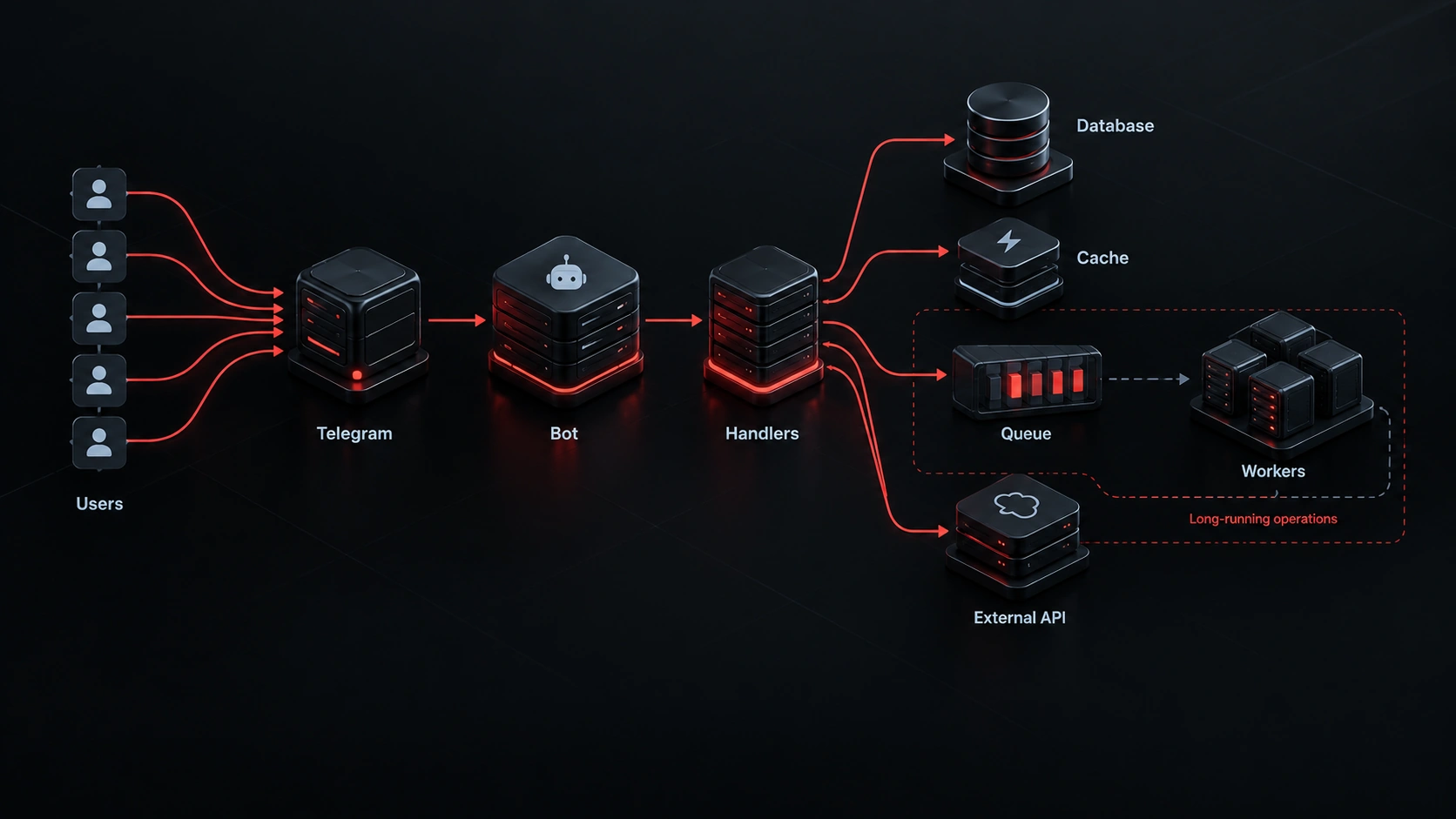
A better architecture can be:
User
  ↓
Telegram Bot
  ↓
Create Job
  ↓
Queue
  ↓
Worker
  ↓
External API
  ↓
Save Result
  ↓
Notify User
Now the bot can acknowledge the request immediately while a worker handles the expensive operation.
Not every operation belongs inside a handler
A common mistake is turning the handler into the entire application.
For example:
async def download_handler(message):
    file = await download_file()
    data = process_file(file)
    result = scrape_website(data)
    result = generate_report(result)
    await save_to_database(result)
    await message.answer("Done")
This may work with a small number of users.
But the user gets no response until every step has finished, and because process_file() and scrape_website() are regular synchronous functions, the event loop is blocked while they run.
A cleaner design is to let the handler coordinate the job:
import asyncio

background_tasks = set()

async def download_handler(message):
    job_id = await create_job(message.from_user.id)

    await message.answer(
        "Your request has been queued. I will send the result when it is ready."
    )

    task = asyncio.create_task(process_job(job_id))
    background_tasks.add(task)
    task.add_done_callback(background_tasks.discard)
Keeping a reference in background_tasks is deliberate: as the Python docs warn, a task with no remaining references can be garbage-collected mid-execution.
For important, long-running, or retryable jobs, however, a real queue and worker system is usually more reliable than an in-process task, which is lost whenever the bot restarts.
More concurrency does not always mean more speed
Another common assumption is:
If we run more tasks at the same time, the bot will become faster.
Not necessarily.
Imagine your bot can create 500 concurrent tasks, but the database can only handle a much smaller useful level of concurrency.
Increasing the number of tasks can simply increase contention.
In aiogram 3, each update is processed in its own task by default, and polling lets you limit how many updates are processed concurrently.
For example:
await dp.start_polling(
    bot,
    tasks_concurrency_limit=100,
)
The number 100 is not a magic value.
The correct limit depends on your application, database, external services, and server resources.
Sometimes reducing concurrency actually makes the system more stable under heavy load.
The goal is not simply maximum concurrency.
The goal is predictable performance under real load.
Polling vs Webhook
Telegram provides two main ways to receive bot updates:
- Long Polling with
getUpdates - Webhook with
setWebhook
These are mutually exclusive: you cannot use both at the same time.
Webhook can be a good choice for production systems, especially when the infrastructure is already built around HTTP and a reverse proxy.
But switching from polling to webhook does not automatically solve application performance problems.
If your architecture looks like:
Telegram
   ↓
Webhook
   ↓
Slow Handler
   ↓
Slow Database
Changing the update delivery mechanism does not fix the database.
Webhook changes how updates reach your application. The internal architecture still determines how efficiently those updates are processed.
Caching can eliminate unnecessary work
Not every piece of data needs to be fetched from the database or an external API every time.
For example, a university name, course metadata, or a configuration value may not change frequently.
A simple cache might look like this:
cache = {}

async def get_university_name(university_id):
    if university_id in cache:
        return cache[university_id]

    university = await load_from_database(university_id)

    cache[university_id] = university.name

    return university.name
This example is intentionally simple.
For production systems, an in-memory dictionary has limitations: it disappears after a restart, is not shared between processes, never expires, and can grow without bound.
For larger applications, Redis or another appropriate caching system may be a better fit.
The important part is not the tool.
The important question is:
What data is expensive to retrieve and does not need to be retrieved every time?
Measure before you optimize
If you do not know what is slow, optimization becomes guesswork.
A simple timer can already reveal a lot:
import time

start = time.perf_counter()

user = await get_user(user_id)

db_time = time.perf_counter() - start

print(f"Database: {db_time:.3f}s")
You can then measure different parts separately:
Handler total: 1.84s
Database:      0.21s
External API:  1.42s
Telegram:      0.17s
In this example, optimizing the database is unlikely to make a major difference.
The external API is the obvious bottleneck.
Simple measurements like this are much more useful than blindly upgrading the server or rewriting the entire bot.
Use symptoms to find the bottleneck
Some common patterns can point you in the right direction:
| Symptom | More likely cause |
|---|---|
| Every handler becomes slow | event loop, CPU, database, or shared resources |
| Only one feature is slow | that specific handler or its dependency |
| Database slows down as users grow | queries, indexes, connection pool |
| Scraping features are slow | external requests or processing |
| Callbacks are also delayed | blocking code in the event loop |
| CPU usage is very high | CPU-heavy processing or inefficient loops |
| CPU is low but responses are slow | I/O, database, network, or external service |
| Restarting temporarily fixes the problem | memory leak, unbounded cache growth, or resource leak |
These are not definitive diagnoses.
They are starting points for investigation.
When should you upgrade the server?
Increasing server resources is sometimes the right solution.
But it should not be the automatic first response.
If CPU is genuinely saturated by CPU-bound work, more CPU can help.
If the application is running out of memory and entering swap, more RAM can help.
But if the situation looks like this:
CPU = 15%
RAM = 40%
Database = slow
Adding more CPU is unlikely to solve the real problem.
The same logic applies to network bandwidth, disk performance, and database connections.
Before upgrading infrastructure, ask:
Which resource is actually the bottleneck?
If you do not have a clear answer, you probably need more measurement first.
What happened on my own bot
Not long ago I moved one of the bots I built with aiogram (a student bot for selling course notes and files) to a new server. The old bot, on a different host, replied in under a second. The new one sometimes took 30 seconds, and sometimes did not reply at all, even with two users.
Instead of guessing, I added a few simple measurement tools:
- a
SLOW handlerlog for handlers over 2 seconds - a
SLOW DBlog for queries over half a second - a tiny monitor that sleeps for 0.25 seconds and measures how late it wakes up: a direct measurement of event loop blocking
The result was interesting: there were two kinds of problems at the same time.
Code problems, all of which are covered in this article:
- The group search ran a separate query for every document: more than 120 queries per search. A classic N+1, reduced to a single query.
bot.get_me()was called on every request, an extra round trip to Telegram. It was replaced with the cached version.- Catalog data was read from MySQL on every request. A five-minute cache, cleared on every write, removed those reads.
- Logging and history writes were synchronous; they moved to a separate thread and queue.
- And one surprising bug: the "no reply at all" cases were not slowness. Messages were sent with Markdown, and when a file name contained
_or*, Telegram returnedcan't parse entitiesand the user got nothing. From the user's side, that also looked like "the bot is slow."
The server problem: after those fixes, the log still showed EVENT LOOP BLOCKED for 15 and 18 seconds, even when nobody was using the bot. A Python script that only called sleep, with no database and no disk, stalled for up to 12.5 seconds. vmstat showed CPU steal up to 42% and iowait up to 57%, and writing 4 KB to disk sometimes took 29 seconds with almost zero load. The virtual machine itself was freezing on its host.
The lesson for me was that "it's the code" and "it's the server" can both be true at once. Without measurement, I would either have upgraded the server and kept the code bugs, or spent days optimizing code that could never be fast on that machine. Measurement is what separated the two.
A better architecture for growing Telegram bots
Once a bot grows beyond a few simple handlers, separating responsibilities becomes increasingly useful.
A scalable structure can look like this:
                 Telegram
                     │
                     ▼
              ┌─────────────┐
              │   Bot App   │
              │   aiogram   │
              └──────┬──────┘
                     │
        ┌────────────┼────────────┐
        ▼            ▼            ▼
     Handler      Database      Cache
        │
        ▼
      Queue
        │
        ▼
     Workers
        │
   ┌────┴─────┐
   ▼          ▼
Scraping   External API
You do not need this architecture on day one.
For a small bot, it may be unnecessary complexity.
But as the number of users, expensive operations, and external dependencies increases, separating these responsibilities can make the system much easier to scale and maintain.
A practical checklist
If your Telegram bot has recently become slow, I would investigate it in this order:
- Measure response times for different handlers.
- Search for
time.sleep()and other blocking operations. - Measure external HTTP requests.
- Inspect frequently executed database queries.
- Look for N+1 query patterns.
- Check database indexes.
- Check database connection usage.
- Move CPU-heavy operations out of handlers.
- Use a queue and workers for long-running jobs.
- Upgrade server resources only after identifying the actual bottleneck.
The order matters.
Removing one unnecessary database query or one blocking operation can sometimes produce a bigger improvement than adding significantly more server resources.
Conclusion
A Telegram bot becoming slow as users grow is rarely caused by one single problem.
The event loop may be blocked by synchronous code. The database may be overloaded with unnecessary queries. An external API may be slow. Or the application may simply be processing more concurrent work than its dependencies can handle.
That is why performance optimization should not start with:
"Let's buy a bigger server."
Start with measurement.
Find the bottleneck.
Fix that bottleneck.
Then scale the infrastructure when the numbers show that infrastructure is actually the limiting factor.
A good Telegram bot is not just fast with ten users. It should remain predictable and stable as traffic grows.
If you are building a Telegram bot as part of a larger product, making the architecture scalable early can prevent many of these problems later. Explore Telegram Bot Development Services
FAQ
Does increasing RAM make a Telegram bot faster?
Only if memory is actually the bottleneck. If the problem is a database query, blocking code, an external API, or CPU-bound processing, adding RAM will not necessarily make the bot faster.
Should every Telegram bot use Webhooks?
No. Telegram supports both Long Polling and Webhooks. The right choice depends on the infrastructure and architecture of the project. Webhooks do not automatically fix internal performance problems.
Is aiogram enough for a large Telegram bot?
For many projects, yes. The main limitation is usually not the framework itself. Application architecture, database design, blocking operations, external services, and concurrency management tend to matter much more.