

If you have built a Django project before, you have probably experienced the moment when everything works perfectly on your own machine but starts behaving differently once the project reaches a real server. Django deployment is not simply copying the project to a VPS and running python manage.py runserver. A production application needs to be prepared for security, application serving, static files, databases, logging, and error handling.
When I work on Django projects, I prefer to treat deployment as part of the application itself rather than something that happens at the very end. A project can be perfectly written and still be badly prepared for production.
This guide is a practical checklist for taking a Django application from development to a real production environment.

Development and production are not the same thing
During development, the priority is usually speed. You want detailed error messages, automatic reloads, simple configuration, and tools that help you write code quickly.
Production has different priorities.
Your application is now exposed to real users, search engine crawlers, unexpected requests, automated scanners, and potentially malicious traffic. A setting that is convenient during development may therefore be completely inappropriate for a public application.
One of the most common deployment mistakes is treating production as if it were just another development machine.
Production should have its own configuration, security rules, access controls, and operational practices.
1. Turn DEBUG off
The first setting I check before deploying a Django project is:
DEBUG = False
With DEBUG=True, Django can expose detailed traceback information when something goes wrong. That information is extremely useful while developing, but it should not be exposed to visitors of a production website.
A production configuration should look more like:
DEBUG = False

ALLOWED_HOSTS = [
    "example.com",
    "www.example.com",
]
The exact configuration depends on your deployment architecture, but the principle is simple: development settings should not accidentally become production settings.
2. Keep SECRET_KEY out of your source code
Another common mistake is storing the production secret key directly inside settings.py and then committing it to Git.
Instead, load sensitive values from the environment:
import os

SECRET_KEY = os.environ["SECRET_KEY"]
Then configure the value on the server:
export SECRET_KEY="your-production-secret-key"
The same principle applies to database passwords, API keys, tokens, and other sensitive credentials.
The exact secret-management solution can vary between projects. You might use environment variables, a .env file that is never committed, or a dedicated secrets manager.
What matters is that sensitive production credentials are not treated as ordinary source code.
3. Configure ALLOWED_HOSTS correctly
Django uses ALLOWED_HOSTS to validate the host header when DEBUG=False.
For example:
ALLOWED_HOSTS = [
    "example.com",
    "www.example.com",
]
Only add domains that your application actually expects to serve.
I would not use ["*"] simply to make a deployment error disappear. Configuration should describe the real environment instead of hiding mistakes.
4. Do not use runserver as your production server
This command is excellent for development:
python manage.py runserver
It is not intended to be the application server for a production website.
A production Django application normally runs through a WSGI or ASGI application server. Gunicorn is a common WSGI option.
For example:
gunicorn config.wsgi:application
Here, config is the Django project package and may have a different name in your project.
In a common setup, the request reaches Nginx first, and Nginx forwards application requests to Gunicorn. Static files are served straight from disk by Nginx and never reach Python at all:
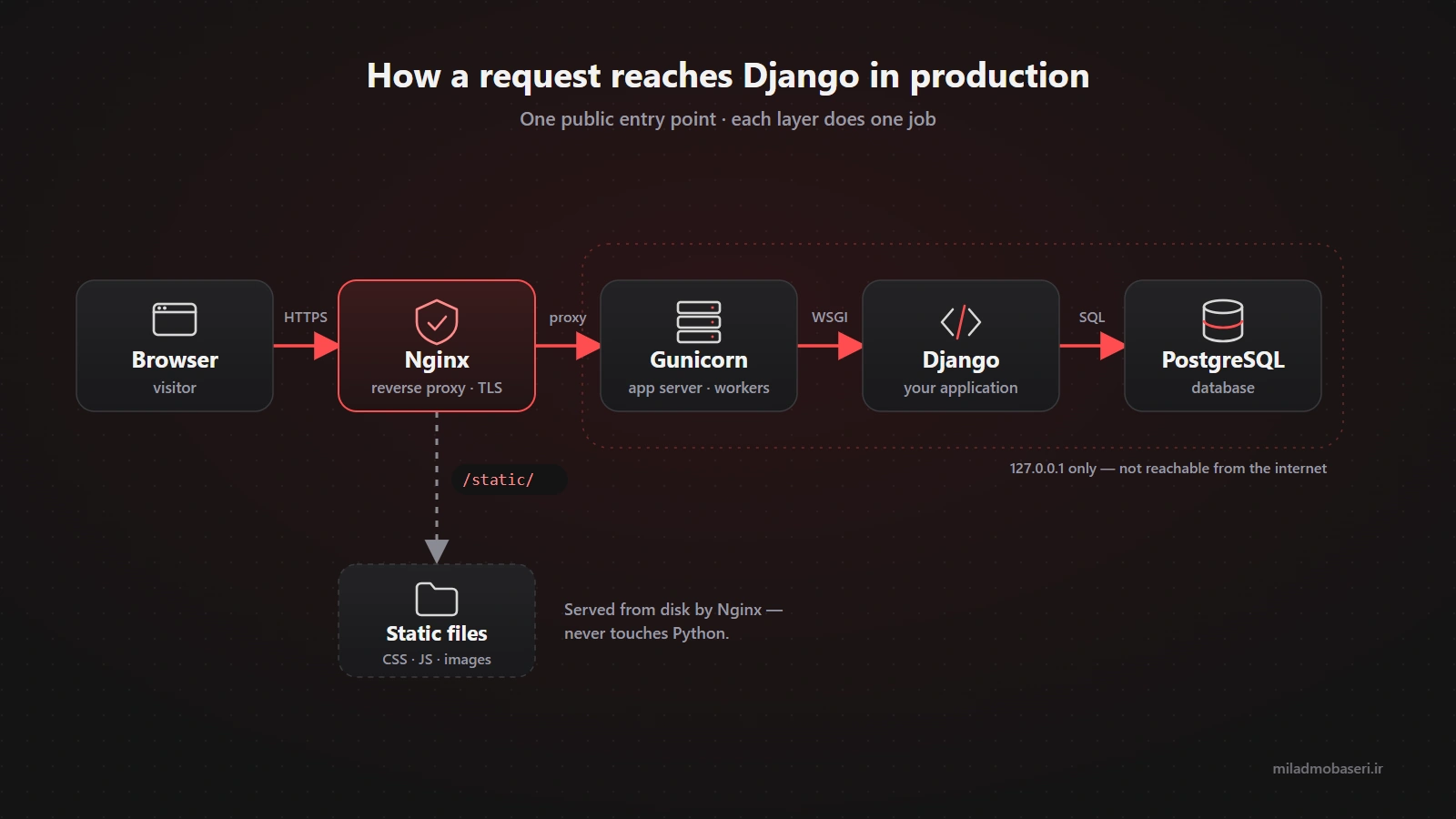
This separation gives each component a clearer responsibility and makes the system easier to operate.
5. Configure static files
One of the most common problems after a Django deployment is a website that loads without its CSS or JavaScript.
In production, Django's static files need to be collected and served correctly.
A typical configuration includes:
STATIC_URL = "/static/"
STATIC_ROOT = BASE_DIR / "staticfiles"
Then run:
python manage.py collectstatic
Django collects the static assets into STATIC_ROOT, after which your web server can serve them.
For example, Nginx can serve /static/ directly instead of sending every static file through Django.
This is one of those things that feels invisible during development because Django makes local development convenient. In production, the responsibility becomes explicit.
6. Take HTTPS seriously
If your application has authentication, sessions, admin access, or any sensitive information, HTTPS should be part of the production setup.
HTTPS is not just about showing a lock icon in the browser. It protects data exchanged between the client and the server from being transmitted in plain text.
After HTTPS is correctly configured, Django's security settings should also be reviewed.
For example:
SECURE_SSL_REDIRECT = True
However, this should not be copied blindly. If TLS is terminated by a reverse proxy or load balancer, proxy and security-header configuration may also need to be considered.
The correct setting depends on the actual architecture.
7. Treat the database as part of deployment
A successful deployment is not just a working homepage.
Your database migrations need to be applied:
python manage.py migrate
Database credentials should also come from the environment rather than being hard-coded.
For example:
import os

DATABASES = {
    "default": {
        "ENGINE": "django.db.backends.postgresql",
        "NAME": os.environ["DB_NAME"],
        "USER": os.environ["DB_USER"],
        "PASSWORD": os.environ["DB_PASSWORD"],
        "HOST": os.environ["DB_HOST"],
        "PORT": os.environ.get("DB_PORT", "5432"),
    }
}
And there is one thing that is often forgotten: backups.
A perfectly healthy application can still lose its data because of an accidental deletion, disk failure, corrupted database, or server problem.
A backup that has never been tested is also not a reliable backup.
8. Run Django's deployment checks
Django provides a useful deployment check command:
python manage.py check --deploy
It can identify several configuration issues that are relevant to production.
I recommend making this part of the deployment process instead of running it once and forgetting about it.
The command is useful, but it should not replace human review. A production deployment still needs to be evaluated based on the actual server architecture and application requirements.
9. Make errors observable
One of the worst production situations is seeing:
500 Internal Server Error
without knowing what caused it.
Your application should have useful logging.
A simple example is:
LOGGING = {
    "version": 1,
    "disable_existing_loggers": False,
    "handlers": {
        "console": {
            "class": "logging.StreamHandler",
        },
    },
    "root": {
        "handlers": ["console"],
        "level": "INFO",
    },
}
For larger applications, dedicated error tracking and monitoring tools can make debugging much easier.
The important idea is that production failures should leave enough information for you to understand what happened.
10. Django security is only one part of system security
Django provides many important security features, but your application does not exist in isolation.
If the project runs on a VPS, you also need to consider the operating system, Nginx, SSH, firewall rules, database access, file permissions, exposed services, and system updates.
For example, if PostgreSQL only needs to be accessed by the application server, there is usually no good reason to expose its port to the entire public internet.
The same principle applies to Redis, internal dashboards, development tools, and other services.
If a service does not need to be reachable from the internet, do not expose it to the internet.
Applications with background work may add Celery and Redis to the same picture; the rule stays the same: only Nginx faces the internet, everything else sits behind it.
Three mistakes I found on my own server
A checklist only starts to mean something once you have felt one of its gaps. I found these three recently on the server behind this very site, a site that "worked" and showed no errors at all.
Submitting a form took 8.8 seconds
The contact form worked, but after pressing send, a visitor waited almost nine seconds. The notification email was being sent through Gmail's SMTP inside the request itself, so the response could not return until Gmail answered.
The fix: the submission is saved to the database first, the response returns immediately, and the email is sent in the background. If the email fails, the visitor's message is still safe.
Anything that depends on an outside service (email, SMS, a third-party API) should not keep the visitor waiting.
Logs only lasted about a week
A friend told me the project form had failed for him. By the time I went looking, the log for that day was gone: the server only kept around a week of logs.
The fix: Django's warnings and errors now also go to a separate, rotating log file that keeps months of history, and every rejected form records exactly why it was rejected.
Security updates were switched off
Unattended upgrades were installed on the server but disabled in their configuration. The result: 89 security packages, including OpenSSH and Nginx, were quietly waiting to be installed.
The fix: automatic updates are now on for security patches only, and a periodic check is part of routine maintenance.
None of these took the site down. That is exactly what makes them dangerous: they stay invisible until the day you need them.
A practical Django deployment checklist
Before calling a Django application production-ready, I would check at least these items:
| Item | Expected state |
|---|---|
DEBUG |
False |
SECRET_KEY |
Outside source code |
ALLOWED_HOSTS |
Limited to required domains |
| HTTPS | Enabled |
| Web server | Nginx or equivalent |
| Application server | Gunicorn / suitable ASGI server |
| Database | Configured and migrated |
| Static files | collectstatic completed |
| Media files | Correct path and permissions |
| Backups | Configured and tested |
| Logging | Available, useful and kept |
| Email and API calls | Outside the request path |
| Server security updates | Automatic |
| Deployment check | check --deploy completed |
If web development with Django is a major part of your work, you can also explore my web development services.
Frequently Asked Questions
Can I run Django with runserver on a production server?
You technically can start it, but it is not designed to be the production application server for a real website. A production deployment should use an appropriate WSGI or ASGI server, commonly behind a reverse proxy such as Nginx.
Does setting DEBUG=False make a Django project secure?
No. It is an essential step, but production security also depends on secrets management, HTTPS, host validation, database security, server configuration, permissions, dependencies, and the overall infrastructure.
What should I run before deploying Django?
A useful built-in check is:
python manage.py check --deploy
It can catch several deployment-related configuration problems, but it should be considered one part of a complete production review rather than a complete security audit.
Conclusion
Django deployment should not mean simply copying a project to a VPS and starting the application. A reliable production deployment considers the application server, web server, database, static files, HTTPS, secrets, logging, backups, and security as one system.
If I had to leave you with one principle, it would be this: treat production as a completely different environment from development. Once you adopt that mindset, many common deployment problems become much easier to prevent.